Can RNA-Seq Analysis Tools Help Identify Problems in the Data?
RNA-Seq analysis tools increasingly make it easy to generate a wide range of results, including PCA plots, heatmaps, differential expression analyses, and enrichment analyses. However, determining whether those results can be trusted requires examining the underlying data.
In an earlier article, Identifying Problems Through Data Visualization, we reanalyzed an RNA-Seq dataset (GSE173789) comparing patients with multiple sclerosis (MS) and healthy controls (HC). We found distortions in the gene count distributions of some samples. These distortions caused many genes to appear relatively upregulated after normalization, and we confirmed that they also affected the results of differential expression analysis. We also identified a subgroup of HC samples with distinct expression patterns.
Can commonly used RNA-Seq analysis tools help researchers identify these underlying patterns and investigate their impact on analysis results? In this series, we use the same dataset to examine whether different tools allow researchers to discover potential problems, investigate their causes, and assess their effects on downstream analyses. Our goal is not to rank analysis tools, but to explore what kinds of analysis environments make it easier for researchers to recognize problems in their data and return to the underlying data to investigate them.
Before continuing, we recommend reviewing the earlier case study or watching the following video from Short Analysis 1 to familiarize yourself with the characteristics of this dataset.
Short Instruction 1: Detecting Potential Outliers with PCA and Confirming Them with Multiple Visualizations
In this article, we try iDEP, a web-based RNA-Seq analysis tool, to see whether its extensive QC visualizations help researchers identify problems in their data and investigate their causes.
iDEP Offers Extensive, Well-Presented Results and Clear Explanations
For this evaluation, we imported the gene count matrix generated using Galaxy into iDEP. iDEP provides a wide range of functions, including preprocessing, QC, clustering, PCA, differential expression analysis, and enrichment analysis. Its results are well organized and clearly presented. What impressed us most was the variety and clarity of its visualizations, together with its detailed explanations of what each analysis does.
RaNA-Seq automatically generates many results, but some aspects of its processing are difficult to understand. In contrast, iDEP provides explanations of preprocessing settings and analytical methods, allowing users to understand what is being done. Its QC visualizations are also more extensive than those we encountered in RNAseqChef. However, understanding what an analytical method does is different from understanding how that method has affected the particular dataset being analyzed. Let's examine the QC results.
The QC Plots Contain Clues to Problems in the Expression Distributions
Differences in Total Read Counts and Dynamic Range After Normalization
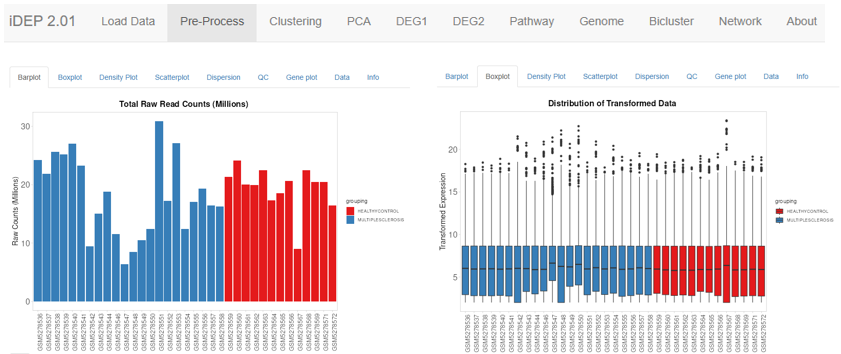
[Figure 1: Total raw read counts for each sample (left) and distributions of transformed expression values (right)]
There were substantial differences in total read counts among samples, although such differences are not unusual in themselves. The plot on the left shows that some samples have considerably fewer total reads than others. In the boxplots on the right, the 75th percentiles of the transformed expression values are aligned, while the lower ends of the distributions still differ substantially between samples. In samples with a narrow dynamic range, normalization raises the lower end of the expression distribution, making large numbers of genes appear upregulated. These two plots illustrate the same phenomenon we examined in article 403.
The important question is whether researchers can relate this effect to downstream analysis results and determine how substantial its impact is. iDEP displays preprocessing settings, and being able to change these settings and observe how the distributions of transformed values change is useful. However, it is questionable whether researchers with limited analysis experience can fully understand and make effective use of these options. Their effects can be examined in certain tabs, such as Boxplot, Dispersion, and Gene plot, but it is difficult to determine directly how these changes affect differential expression results or clustering.
iDEP explains what processing is performed. However, understanding how that processing affects the actual data requires researchers to connect information from multiple plots, which may be difficult without considerable analytical experience.
Does the Density Plot Really Show a Difference Between HC and MS?
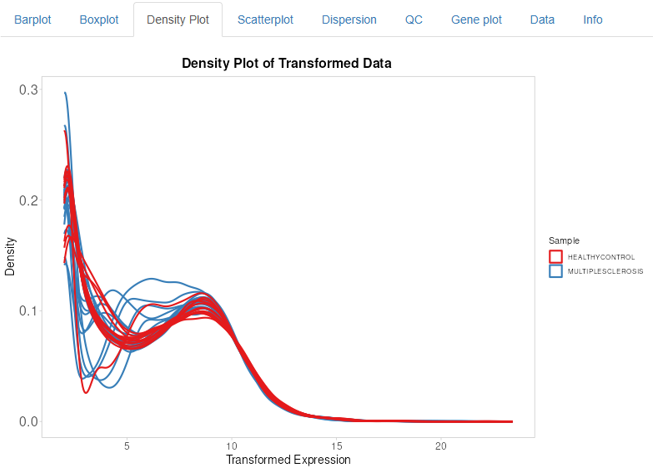
[Figure 2: Density plot]
Red represents HC samples, while blue represents MS samples. At first glance, the expression distributions appear to differ between HC and MS. However, that is not what is actually happening. The distorted distributions belong to a subset of the MS samples and one HC sample. Approximately half of the MS samples have distributions similar to those of most HC samples. Many of their blue curves overlap with the red curves and are therefore difficult to distinguish. It would be difficult to recognize this from the plot alone.
Instead, researchers might interpret the figure as showing a difference between HC and MS, following the group assignments they made at the beginning of the analysis. Once they adopt that interpretation, they may also interpret subsequent PCA and differential expression results within the same framework. It would be helpful to select a suspicious curve and identify the corresponding sample. However, this plot is static and provides no interactive way to do so.
The Scatter Plot Can Reveal Distorted Distributions Between Two Samples
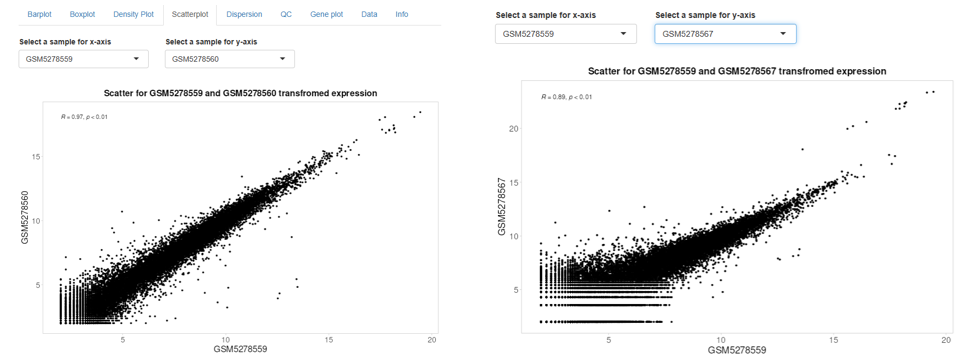
[Figure 3: Scatter plots comparing two samples]
iDEP also provides scatter plots for comparing expression values between any two selected samples. By changing the sample combination, we can eventually identify samples with unusual relationships between expression values, as shown in the plot on the right. This is a useful feature, but the problem is knowing which samples to compare. When a dataset contains many samples, changing the combinations one by one to identify problematic samples is impractical.
If we could select a suspicious sample in any of the tabs from Barplot through Gene plot and then track that sample across the other tabs, exploratory investigation would become much easier. iDEP provides a considerable amount of useful QC information. However, the plots operate independently rather than being linked together, which substantially limits their usefulness for exploratory investigation.
Gene Plot Can Display Problematic Genes, but Finding Them Is Another Matter
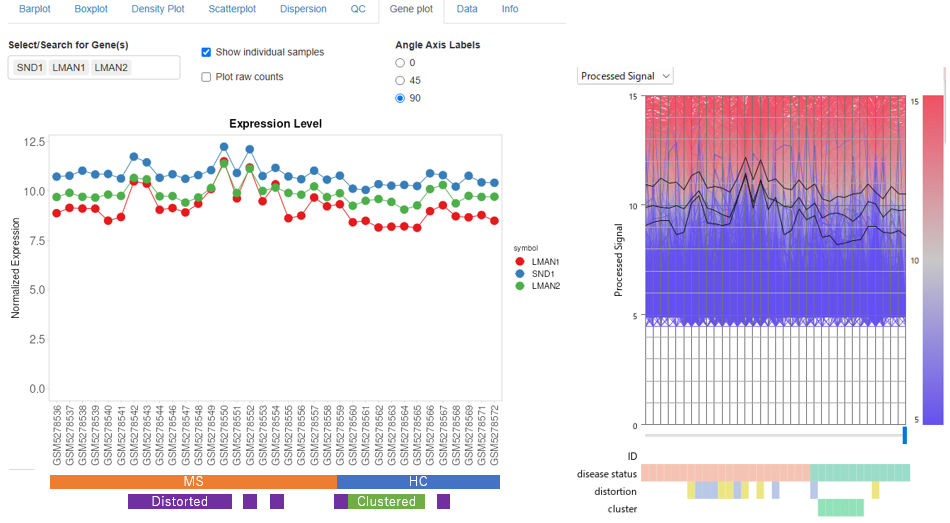
[Figure 4: Transformed expression data displayed in iDEP (left) and Subio Platform (right). Note: The two tools use different data transformation methods, so their expression values and scales are not directly comparable.]
In iDEP's Gene plot, users can enter gene names to display their expression profiles. Here, we examined SND1, LMAN1, and LMAN2. The left panel shows the iDEP visualization, and the right panel shows the corresponding display in Subio Platform. These genes illustrate how normalization raises the transformed expression values in certain samples, making them appear upregulated in the MS group.
We also compared their raw counts. Compare the plots before and after normalization.
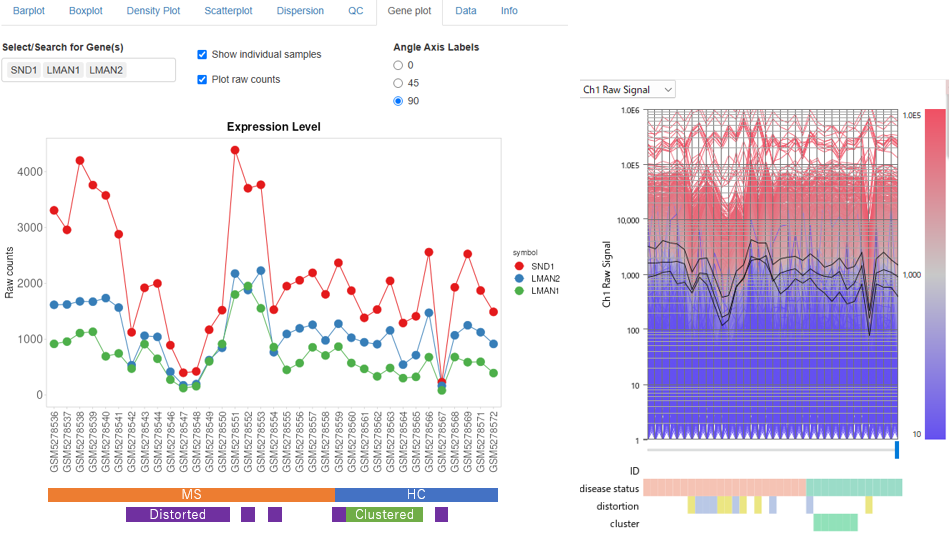
[Figure 5: Raw count data displayed in iDEP (left) and Subio Platform (right). Note: Gene colors differ between Figures 4 and 5.]
There are two important points to keep in mind when examining these figures. First, the colored blocks beneath the sample names in the iDEP panels were added by the author. We added them to make the differences between samples easier to recognize. iDEP does not display this information by default, making it very difficult to relate the expression profiles to the characteristics of individual samples.
Second, these genes were not discovered using iDEP. We had already investigated the expression distributions in Subio Platform and identified genes associated with the distortions. Only then did we enter their names into iDEP. Using iDEP alone, it is difficult to discover which genes deserve investigation in the first place, relate their behavior to sample-wide expression patterns, and examine the causes of the observed differences.
The Heatmap Reveals Both Patterns Identified in Our Earlier Analysis
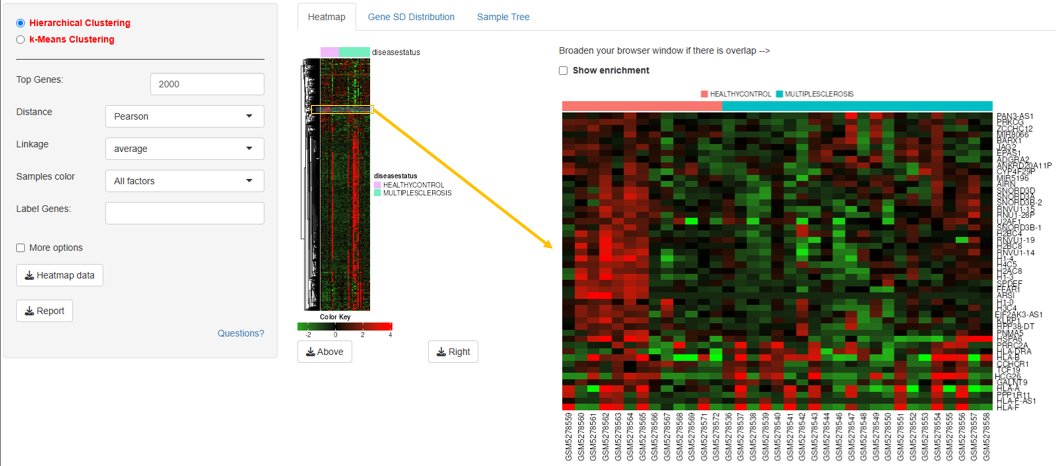
[Figure 6: Full heatmap and an enlarged region]
The iDEP heatmap also reveals the features previously identified in article 403. In the full heatmap, a large group of genes appears highly expressed (red) in certain samples. This reflects the behavior of genes whose normalized expression values were artificially elevated by distortions in the expression distributions. When we enlarge part of the heatmap, we can also see that approximately half of the HC samples share a particular expression pattern. In other words, both features we identified in the original analysis are visible in the iDEP heatmap.
However, after importing the data and assigning the experimental groups, the analysis proceeds automatically. Even though various QC plots are presented along the way, researchers may simply move on to examining the results and interpreting their biological meaning, assuming that the analysis has proceeded without problems. A careful researcher might notice the unusual expression patterns in particular samples and decide to investigate further.
The heatmap supports zooming, so it is possible to identify genes of interest, write down their names, return to Gene plot, and examine their expression profiles. However, this process is somewhat cumbersome. It is also difficult to check whether those genes have been identified as DEGs, creating another obstacle to exploratory investigation. The iDEP heatmap does offer a useful feature: selecting and enlarging a region automatically performs enrichment analysis on the genes within that region.
iDEP provides extensive functionality for examining analysis results and exploring their biological meaning. However, the flexibility to investigate whether an observed pattern might have arisen from problems in the underlying data is much more limited.
PCA Also Provides Clues About What Drives the Observed Patterns
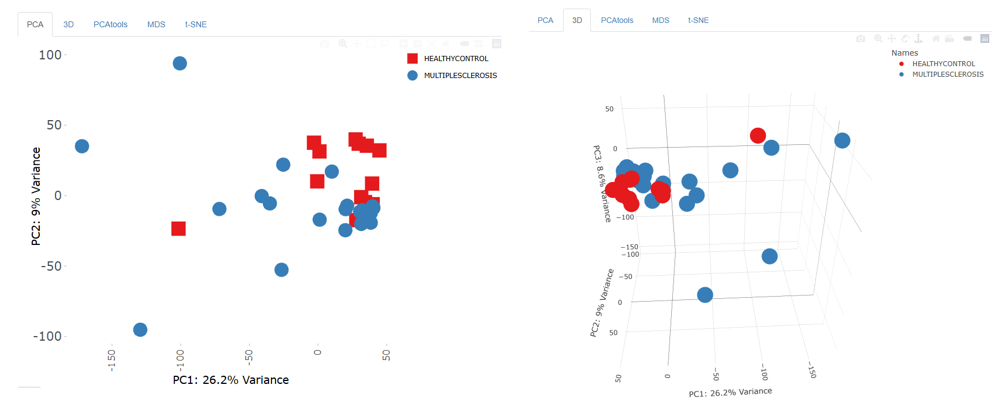
[Figure 7: PCA in two dimensions (left) and three dimensions (right)]
The PCA results reproduced the sample structure observed in our evaluations of Galaxy, RaNA-Seq, and RNAseqChef. Some samples are separated from the others along PC1, reflecting the effects of distorted expression distributions. As discussed in the earlier articles, however, researchers with limited experience who are primarily interested in differences between HC and MS might be tempted to interpret this separation as evidence of a distinct expression pattern in a subset of MS samples.
The issue is that, although PCA reveals these unusual samples, iDEP does not provide a direct way to connect them to the QC plots and determine whether the separation is caused by distortions in the data.
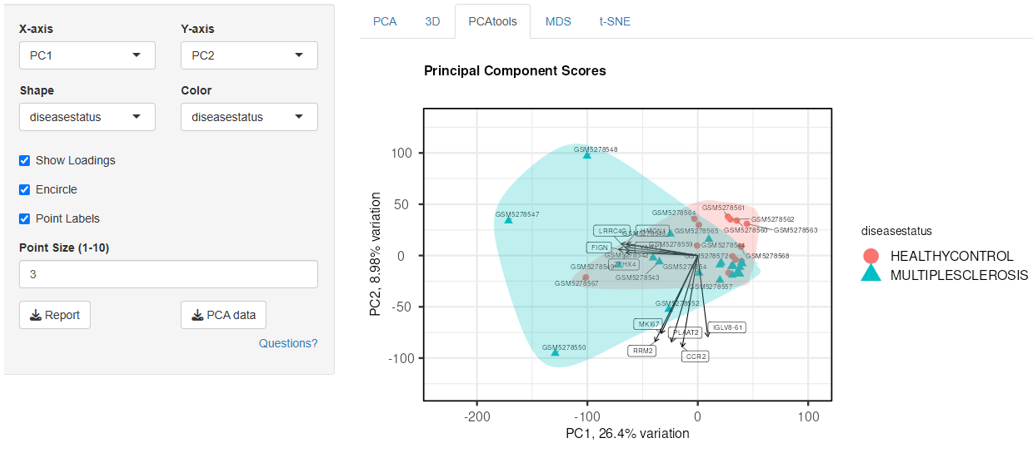
[Figure 8: The Show Loadings option in PCA Tools]
One particularly useful iDEP feature is Show Loadings. Enabling this option displays genes that contribute to the separation of samples in the PCA plot. Rather than simply showing that samples differ, it provides clues about which genes contribute to those differences. However, users have limited control over the criteria used to select the displayed genes or how many are shown. There are also limitations to following up on the displayed genes by examining their expression distributions across individual samples.
Differential Expression Plots Do Not Allow Us to Trace the Causes of Expression Differences
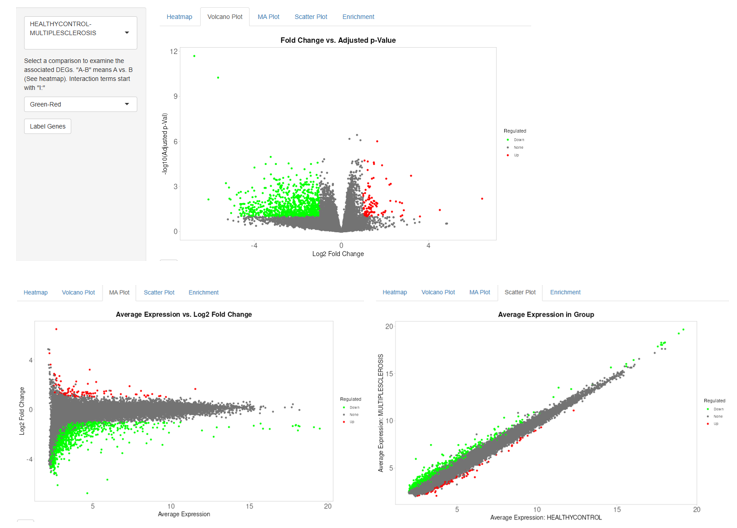
[Figure 9: Differential expression analysis results (Volcano plot, MA plot, and Scatter plot)]
Finally, we performed differential expression analysis comparing HC and MS. iDEP provides several visualizations, including Volcano plots, MA plots, and Scatter plots. However, the plots we examined were static. We could not select a gene of interest directly from these plots and inspect its expression profile. In this respect, iDEP was less convenient than the other tools we evaluated. We also found it frustrating that gene names could only be displayed in the heatmap and that there was no option to search for a particular gene by name.
More importantly, it was extremely difficult to investigate how distortions in the expression distributions of certain samples affected DEG identification, which is the central question of this series.
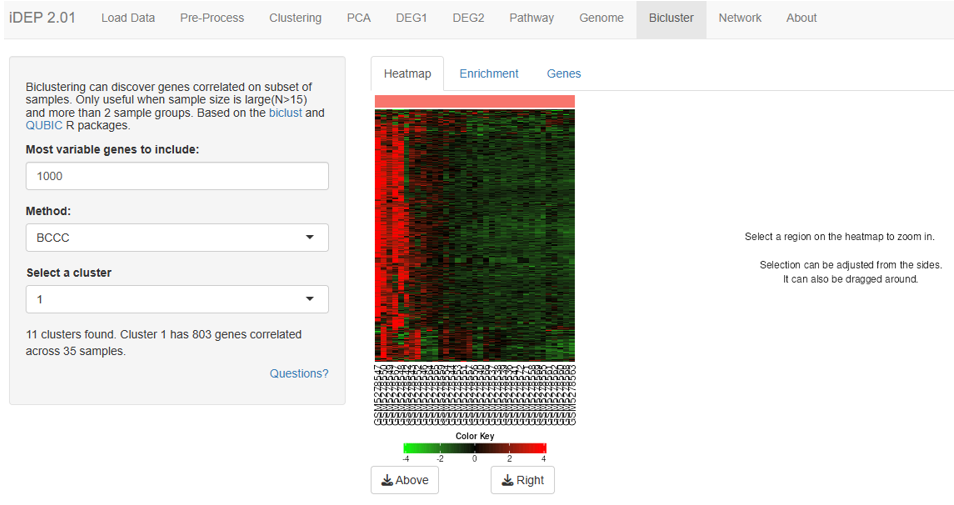
[Figure 10: Heatmap of differentially expressed genes]
iDEP can display DEGs in a heatmap. From this heatmap, it is possible to suspect that certain samples have a strong influence on which genes are identified as DEGs. However, when there are many samples, it is difficult to determine which samples belong to HC or MS, let alone decide which individual samples should be investigated. On the other hand, selecting a region of the heatmap by dragging enlarges it, allowing sample names to be identified. Thus, iDEP does provide some clues that can help researchers investigate potential problems.
The difficulty is that the workflow does little to encourage researchers to question the quality of their data, and even when they do become suspicious, the interface makes further investigation difficult.
Evaluating iDEP: Extensive Results, but Limited Support for Exploratory QC
Overall, iDEP provides a wide variety of clearly presented analysis results, accompanied by helpful explanations of what each analysis does. Its QC plots for comparing expression distributions, clustering based on genes with high standard deviations, and the Show Loadings feature in PCA are all valuable. For performing standard RNA-Seq analyses and examining a wide variety of results, we would recommend iDEP over RaNA-Seq or RNAseqChef based on our experience with these tools.
However, the purpose of this evaluation was not to compare the number of analysis functions or the clarity of the visualizations. The question was whether researchers could recognize problems in their data, investigate their causes, and determine whether the resulting analyses could be trusted.
iDEP appears to be designed primarily to present a wide range of results clearly and help researchers explore their biological meaning, assuming that the input data are suitable for analysis. That is a reasonable design approach. However, when the input data contain problems, the tool offers limited support for recognizing those problems and investigating their causes. The clues were certainly present in the QC plots, PCA results, and heatmaps. Yet it was difficult to connect those observations, determine how strongly the problems affected downstream results, or investigate their underlying causes.
More importantly, does the tool help researchers recognize that there may be a problem in the first place? The abundance and clarity of iDEP's analysis results are significant strengths. But these qualities alone do not guarantee the reliability of the conclusions drawn from an iDEP analysis.
A Common Problem Revealed by Evaluating Four Tools
In the first article of this series, we identified a pattern in a publicly available RNA-Seq dataset in which a particular subset of samples had a substantial influence on the differential expression results. However, we could not find any discussion in the original paper or its supplementary materials examining the impact of those samples on the analysis results. The paper nevertheless passed peer review and was published. Moreover, in my experience reanalyzing publicly available datasets, I have repeatedly encountered similar situations.
Why do such issues sometimes remain insufficiently investigated, not only during the original analysis but also during peer review? To explore a possible explanation, we followed the analysis workflows for the same dataset using Galaxy, RaNA-Seq, RNAseqChef, and iDEP. Each tool has its own strengths. We found thoughtful approaches to workflow flexibility, automation, analytical functionality, and the presentation of results. The convenience of automated tools was particularly appealing.
At the same time, we found a common limitation: these tools provide insufficient support for exploratory investigation that begins with a fundamental question: "Could there be something wrong with the input data?" It is not that the tools provide no clues about potential problems. Rather, connecting those clues to other analysis results and investigating their causes and consequences is often difficult. Experienced researchers with sufficient knowledge may recognize such problems and use additional methods or tools to investigate them. But this means that the ability to identify problems depends heavily on the individual researcher's experience and attentiveness.
The way these tools are designed may be one reason why problems in research data go unnoticed. When generating QC reports becomes an end in itself, researchers may miss opportunities to investigate the causes of potential problems and their effects on downstream analyses, even when the reports contain clues that something is wrong. As a result, findings derived from problematic data may be published in scientific papers without sufficient scrutiny.
Automating analysis workflows and presenting results clearly offer substantial benefits. However, these features alone do not guarantee reliable analysis results. Analysis tools must do more than produce results: they must also help researchers question those results, return to the underlying data, and investigate whether their conclusions can be trusted.
I hope this series will also reach others involved in developing RNA-Seq analysis tools and encourage further discussion about how we can help researchers identify and investigate problems in their data.
Series: Can RNA-Seq Analysis Tools Help Identify Problems in the Data?
In this series, we use the same RNA-Seq dataset (GSE173789) to investigate whether different analysis tools can help researchers identify hidden problems, explore their causes, and assess their impact on analysis results.
- Identifying Problems Through Data Visualization — How distorted expression distributions affect analysis results
- RNA-Seq Analysis Using a Standard Galaxy Workflow — Exploring data quality through a standard analysis workflow
- Trying RaNA-Seq — Automated analysis from FASTQ files and evaluation of the results
- Trying RNAseqChef — Extensive analysis features and their limitations for exploratory QC
- Trying iDEP — Can its QC visualizations help identify problems in the data? (This article)