If you have a URL that provides direct access to a FASTQ.gz file, RaNA-Seq can convert it to Gene Counts extremely quickly and easily. In particular, when direct FASTQ.gz URLs are available from ENA or another source, this method is much faster than retrieving GEO data through SRA and converting it to FASTQ first. If you have an SRR accession, AI can also help you find the corresponding direct FASTQ.gz URLs on ENA.
Advantages of this method
The main advantage is that you can go from public FASTQ files to Gene Counts in a very short time. You do not need to download the FASTQ files to your own computer and then upload them again to RaNA-Seq. Instead, you can provide RaNA-Seq with the FASTQ.gz URLs directly. After RaNA-Seq calculates the Gene Counts, you only need to download the resulting table as a text or Excel file, so only a very small file needs to be stored locally.
The workflow is therefore very simple:
Obtain FASTQ.gz URLs → Enter the URLs in RaNA-Seq → Run Quantification → Download Gene Counts
This gives you a quick and simple way to obtain a Gene Counts table for downstream analysis.
When this method can be used
This method can only be used when you have URLs that provide direct access to the FASTQ.gz files themselves.
For single-end data:
https://.../xxxxx.fastq.gz
For paired-end data:
https://.../xxxxx_1.fastq.gz
https://.../xxxxx_2.fastq.gz
If ENA or another source provides direct FASTQ.gz URLs in this format, you can use them. The important point is that the URL must point to the FASTQ.gz file itself, rather than to a download page or file-sharing page.
Important limitation
File-sharing services such as Dropbox may provide only a link to a sharing page rather than a direct URL in this format. In that case, this method cannot be used.
RaNA-Seq also provides options for uploading local FASTQ files and retrieving data using an ENA Study Accession, but neither worked successfully in our testing.
Procedure
1. Obtain the FASTQ.gz URLs
For single-end data, you need one direct FASTQ.gz URL. For paired-end data, you need two URLs corresponding to R1 and R2.
2. Open the Upload New Files page in RaNA-Seq
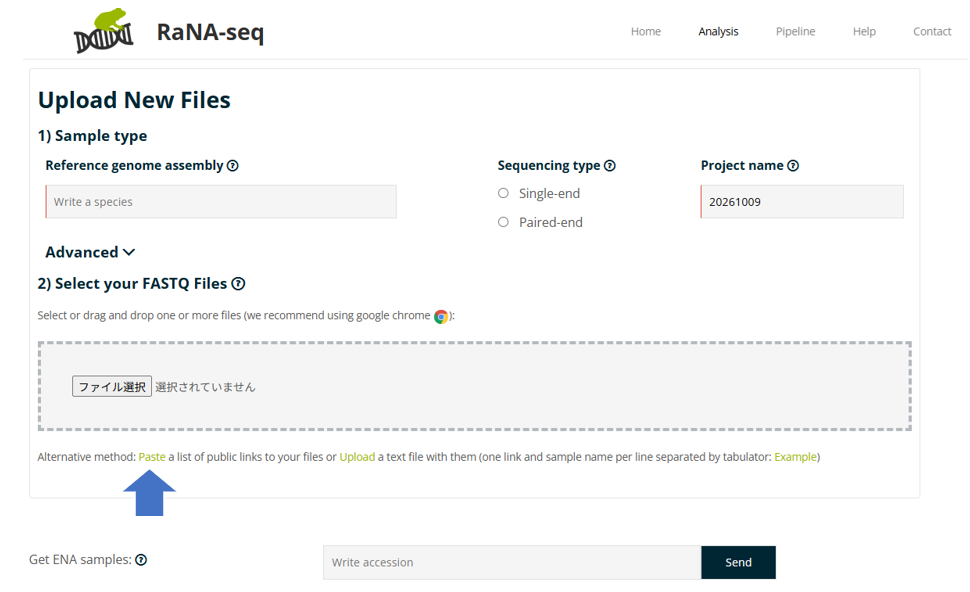
Open the Upload New Files page in RaNA-Seq. At the bottom of the page, click Paste under Alternative method.
3. Enter the FASTQ.gz URLs
Enter the FASTQ.gz URLs. For paired-end data, specify both R1 and R2. You can enter multiple FASTQ files at once by placing one URL on each line.
4. Run Quantification
Once the FASTQ files have been added, run Quantification in RaNA-Seq. When the process is complete, the Gene Counts will be available.
5. Download the Gene Counts
Download the calculated Gene Counts table as a text or Excel file.