With RaNA-Seq, you can obtain Gene Counts extremely quickly and easily simply by providing direct URLs to FASTQ.gz files. In particular, when direct FASTQ.gz URLs are available from ENA or other repositories, this approach is dramatically faster than converting SRA data to FASTQ and downloading the resulting files. You can also ask an AI assistant to help you find direct FASTQ.gz URLs on ENA using SRR accession numbers.
Advantages of This Method
The biggest advantage of this method is that you can go from publicly available FASTQ files to Gene Counts in very little time. There is no need to download FASTQ files to your computer and then upload them to RaNA-Seq. Instead, you can provide the FASTQ.gz URLs directly to RaNA-Seq. You can then download the resulting Gene Counts table as a text or Excel file, so only a relatively small file needs to be stored locally.
The workflow is straightforward:
Prepare FASTQ.gz URLs → Enter URLs in RaNA-Seq → Run Quantification → Download Gene Counts
With just these steps, you can obtain a Gene Counts table for downstream analysis.
Requirements for Using This Method
This method requires URLs that provide direct access to the FASTQ.gz files themselves.
For single-end sequencing, you need a URL such as:
https://.../xxxxx.fastq.gz
For paired-end sequencing, you need two URLs:
https://.../xxxxx_1.fastq.gz
https://.../xxxxx_2.fastq.gz
If ENA or another repository provides direct URLs to FASTQ.gz files, you can use them. The important point is that the URLs must point directly to the FASTQ.gz files, not to download pages or file-sharing pages.
Important Notes
File-sharing services such as Dropbox may provide links to shared pages rather than direct file URLs. If you cannot obtain direct FASTQ.gz URLs, this method cannot be used.
RaNA-Seq also provides options for uploading local FASTQ files and retrieving data using ENA Study Accessions. However, neither option worked successfully in our tests.
Gene Counts obtained from RaNA-Seq are estimated counts and may contain decimal values. Because RaNA-Seq uses a different quantification method from pipelines based on HISAT2 and StringTie, the resulting counts may differ. Nevertheless, they can be used for a variety of gene expression analyses.
Step-by-Step Instructions
1. Prepare FASTQ.gz URLs
For single-end sequencing, prepare one direct URL to a FASTQ.gz file. For paired-end sequencing, prepare two URLs, one for R1 and one for R2.
2. Open the Upload New Files Page in RaNA-Seq
Open the Upload New Files page in RaNA-Seq.
At the bottom of the page, click Paste under
Alternative method.
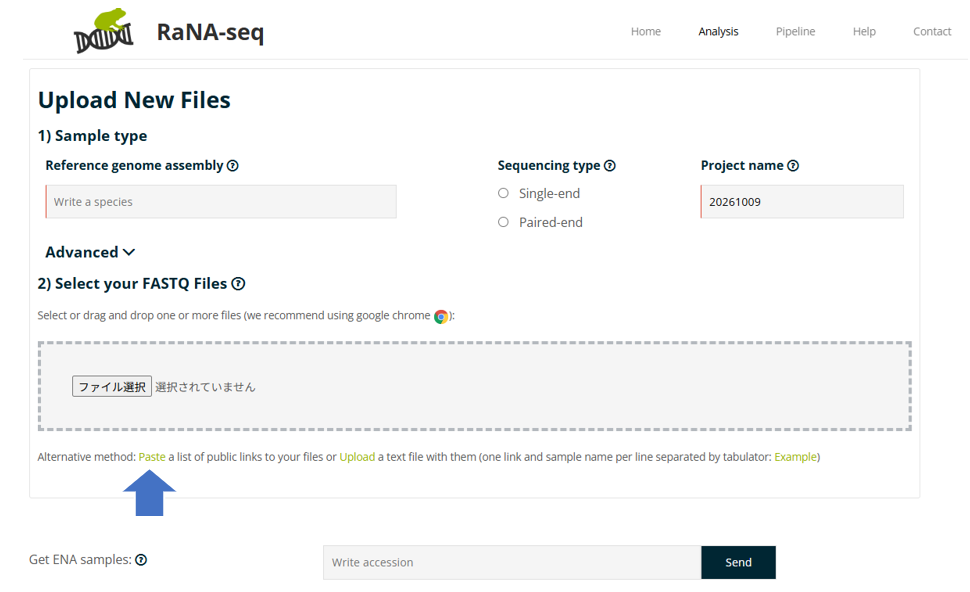
3. Enter the FASTQ.gz URLs
Enter the FASTQ.gz URLs you prepared. For paired-end sequencing, provide both the R1 and R2 URLs. You can specify multiple FASTQ files by entering one URL per line.
4. Run Quantification
Once the FASTQ files have been registered, run Quantification in RaNA-Seq. When processing is complete, the Gene Counts will be available.
5. Download Gene Counts
Download the resulting Gene Counts table as a text or Excel file.
Prepare the Data for Analysis in Subio Platform
The Gene Counts file downloaded from RaNA-Seq is basically a table of Ensembl Gene IDs and Gene Counts.
First, if the Ensembl Gene IDs include version numbers, such as .18,
remove the suffix.
For example, change ENSG00000141510.18 to
ENSG00000141510.
However, we do not recommend using these Ensembl Gene ID-based Gene Counts directly for gene-level expression analysis. Multiple Ensembl Gene IDs can correspond to the same Gene Symbol, and at the ENSG ID level, additional variation may appear that does not reflect the overall expression change of the gene. For details, see For Gene-Level Analysis, Sum ENSG ID-Based Gene Counts by Gene Symbol .
Therefore, for gene-level analysis, first prepare a table containing Ensembl Gene ID, Gene Symbol, and Gene Counts, and then import the data into Subio Platform using Gene Symbol as the ID.
There are two ways to add Gene Symbols.
Method 1: Add Gene Symbols using Subio Platform
First, import the Gene Counts downloaded from RaNA-Seq into Subio Platform
using an Ensembl Gene ID-based Platform.
Then export the Ch1 Raw Signal table together with the Gene Symbol column.
This gives you a table containing Ensembl Gene ID, Gene Symbol, and Gene Counts.
Method 2: Add a Gene Symbol column to the downloaded file
If you can obtain the mapping between Ensembl Gene IDs and Gene Symbols, you can add a Gene Symbol column directly to the file downloaded from RaNA-Seq. This also gives you a table containing Ensembl Gene ID, Gene Symbol, and Gene Counts.
Re-import the data using Gene Symbol as the ID
Once you have prepared a table containing Gene Symbols, select a Gene Symbol-based Platform, rather than an Ensembl Gene ID-based Platform, in the Subio Platform Sample Import Wizard.
Then, under How to calculate signals for same IDs,
select Sum.
This causes the Counts from multiple Ensembl Gene IDs corresponding to the same
Gene Symbol to be summed within each sample and imported as
Gene Symbol-level Gene Counts.