In Subio Platform, the original imported values are stored as Ch1/2 Raw Signal, while the final values after normalization are stored as Processed Signal.
Intermediate Signal is a feature that allows users to save values at a selected stage of normalization and switch between these values and the final results. By providing an additional point of observation within the normalization workflow, it allows users to examine values at different processing stages and investigate how normalization changes the data.
What Is Intermediate Signal?
Subio Platform allows multiple normalization steps to be performed sequentially within the Normalize workflow. With Intermediate Signal, users can save the values immediately after a selected normalization block has been executed.
| Signal | Stored Values |
|---|---|
| Raw Signal | Original imported values |
| Intermediate Signal | Values immediately after the selected normalization block |
| Processed Signal | Values after all normalization blocks have been executed |
Users can choose which stage of normalization to save as Intermediate Signal. For example, they can select a stage after log transformation, Low Signal Cutoff, Fill Missing Value, Centering, or another normalization step.
Example: Switching Between Expression Levels and Relative Changes
In RNA-Seq data analysis, normalization across samples and log transformation may be followed by Centering, which centers the expression values for each gene to facilitate comparison of relative changes. Processed Signal after Centering allows users to compare expression patterns across genes, but differences in expression levels between genes can no longer be determined. By saving the values immediately before Centering as Intermediate Signal, users can examine relative changes using Processed Signal while also checking normalized expression levels using Intermediate Signal.
In this way, Intermediate Signal allows users to examine the same dataset using values from different processing stages.
This is just one example of how Intermediate Signal can be used with RNA-Seq data. The feature is not limited to RNA-Seq and can be used with various types of data supported by Subio Platform.
How to Use Intermediate Signal
1. Configure Normalization
Open the target Series and configure the order and parameters of the normalization blocks in Normalize.
2. Select the Stage to Save
Click the pin on the right side of the normalization block corresponding to the stage you want to save as Intermediate Signal.
The values immediately after the selected block has been executed will be saved.
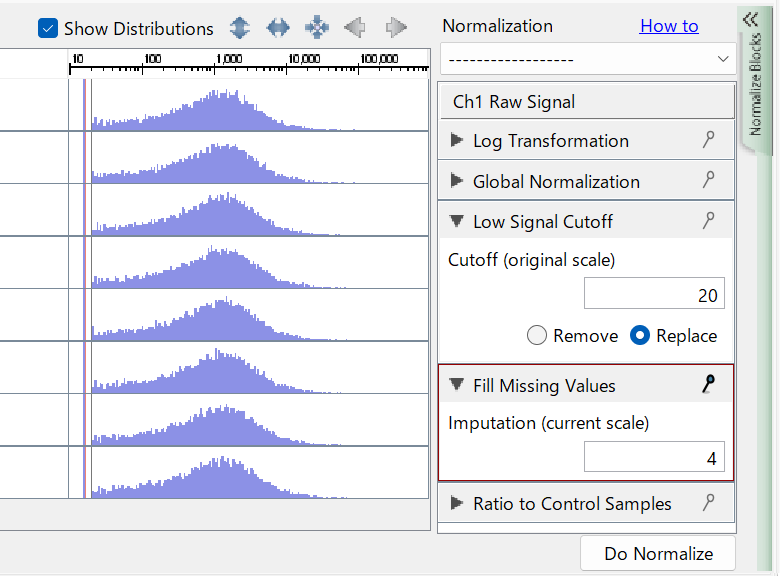
3. Execute Normalization
Click Do Normalize to execute normalization.
The values at the selected stage are saved as Intermediate Signal, while the values after all normalization blocks have been executed are saved as Processed Signal.
4. Display Intermediate Signal
Select Intermediate Signal as the signal to display to view the saved intermediate values. Intermediate Signal can be used in supported visualizations, including line graphs, scatter plots, and heatmaps. Axis and color settings can also be configured specifically for Intermediate Signal.
Intermediate Signal columns can also be displayed in Datasheets.
Important Notes
Only One Intermediate Stage Can Be Saved per Series
Only one intermediate stage can be saved per Series as Intermediate Signal. Pinning a different normalization block changes which stage will be saved the next time normalization is executed. The feature does not support saving values from multiple intermediate stages simultaneously.
Rerun Normalization After Changing the Pin
Changing the pin selection alone does not update the previously saved Intermediate Signal values. If you change the selected stage or the normalization settings, click Do Normalize again.
Saving Intermediate Signal in SSA Files
Intermediate Signal values themselves are not included in SSA files. However, the pin selection for the normalization block is preserved. After importing an SSA file, you can recreate Intermediate Signal by clicking Do Normalize.
Related Topics
- Editing Normalization — Explains how to adjust normalization and preprocessing settings based on the characteristics of your data.
- RNA-Seq Normalization Presets — Explains normalization and preprocessing settings for Gene Counts, TPM, FPKM, and RPKM, and the purpose of each step.