This page explains how Mac users can prepare their environment to import RNA-Seq FASTQ files into Subio Platform. If you are using Windows, please see the Windows instructions.
To process RNA-Seq FASTQ files with Subio Platform, you need to prepare fastp, HISAT2, StringTie, a HISAT2 index, and a GTF file.
The installation procedures for macOS and these tools may change over time. Therefore, we recommend following the general steps below and, when necessary, asking ChatGPT or another AI assistant for help with the specific procedures.
1. Prepare fastp, HISAT2, and StringTie
Subio Platform uses the following tools to process RNA-Seq FASTQ files:
- fastp: removes adapter sequences and low-quality reads
- HISAT2: maps sequencing reads to a reference genome
- StringTie: estimates gene expression levels from the mapping results
Prepare executable files that can run on macOS for each tool.
The installation procedure may differ depending on your macOS version and whether you are using an Intel Mac or an Apple Silicon Mac. If necessary, specify the tool version and your Mac environment and ask an AI assistant a question such as, "How can I install this version of fastp on macOS?"
After installation, you can check the path to each executable by running the following commands in Terminal:
which fastp
which hisat2
which stringtie
The paths displayed by these commands can later be specified in the Subio Platform settings.
Do not include spaces or non-ASCII characters in the paths to the fastp, HISAT2, and StringTie executable files.
2. Download a HISAT2 Index and GTF File
Next, prepare a HISAT2 index and GTF file for the species you want to analyze.
HISAT2 indexes can be downloaded from the HISAT2 Download page.
Several types of indexes may be available for the same genome. For standard RNA-Seq analysis, use the genome_tran version, which includes known transcript information.
The GTF file must correspond to the same species and genome version as the HISAT2 index.
For instructions on how to obtain an appropriate GTF file from Ensembl, see:
How to Obtain a GTF File for the Appropriate Species and Genome Version from the Ensembl FTP Site
Do not include spaces or non-ASCII characters in the folder paths containing the HISAT2 index and GTF file.
3. Prepare the FASTQ Files
Save the FASTQ files to be analyzed in a folder on your Mac.
Do not include spaces or non-ASCII characters in the folder path containing the FASTQ files.
4. Specify the File Locations in Subio Platform
After preparing the required files, open the RNA-Seq FASTQ file import screen in Subio Platform and click Settings... to specify the locations of the fastp, HISAT2, and StringTie executable files, as well as the HISAT2 index and GTF file.
Specify each file in the corresponding field as shown below.
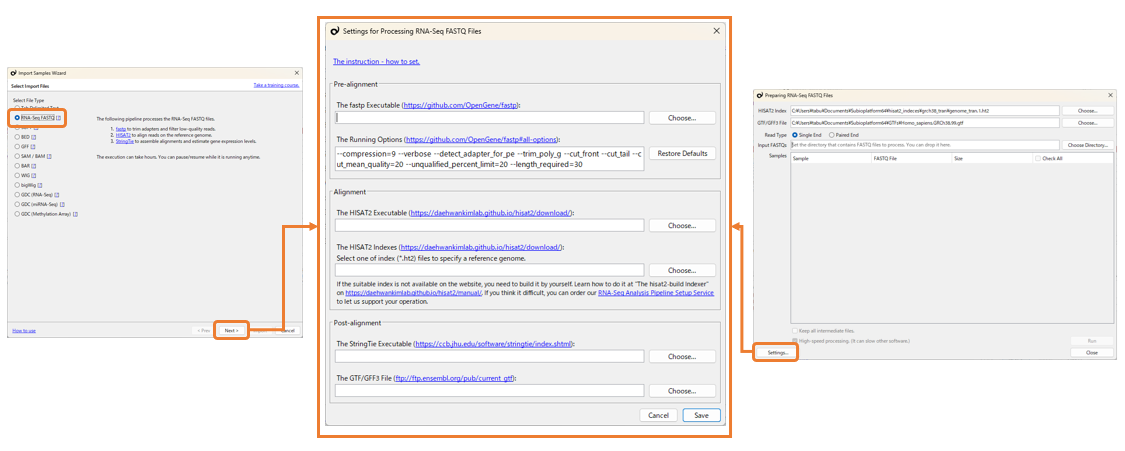
After completing the settings, we recommend first confirming that the pipeline runs correctly using a small portion of the FASTQ data.
Processing an entire FASTQ file may take a long time. If you want to perform a short test to confirm the settings, add the following fastp option:
--reads_to_process=10000
This processes only the first 10,000 reads, or the first 10,000 read pairs for paired-end data. This is intended only to confirm that the pipeline runs correctly. After confirming successful processing, remove this option and process all reads.
Versions Confirmed to Work
We have confirmed that the tools described above run correctly with Subio Platform using the following versions. Other versions may cause errors.
- fastp 0.22.0
- HISAT2 2.1.0
- StringTie 2.1.1
If you encounter a problem, first check whether you are using the versions listed above.
If you are still unable to resolve the problem after checking the points above, you can also use our FASTQ Processing Troubleshooting Service .